Pay Your Bill
Pay electronically using a check, debit card, or credit card.
Pole Work in Several Towns. No outages are expected. Learn more.
Pay your bill, track your electricity use, go paperless, and receive account alerts—all in one convenient place.
New users: choose the sign-up option on the SmartHub login page.
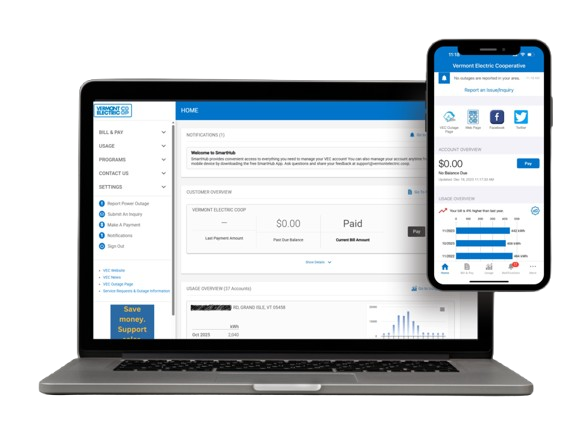
SmartHub makes it easier to manage your VEC account from your computer, smartphone, or tablet.
Pay electronically using a check, debit card, or credit card.
Choose when to make your next payment.
Receive your electric bill and Co-op Life newsletter electronically, and manage your paperless preferences through SmartHub. Learn more.
View electricity usage by month, day, or hour.

Access outage information and stay informed.
Choose email or text notifications about your account.
Create your account in just a few simple steps. Have your VEC account number and email address handy.
Prefer to see the process? Follow along with our video tutorial.
Video not loading? Watch it on YouTube.
Answers to common questions about signing up and using your account.
With SmartHub, you can pay or schedule bill payments, go paperless, track electricity use by month, day, or hour, check for outages, and receive account alerts.
No. You can still use VEC's other payment methods. SmartHub simply gives you additional convenient options for electronic payments. View payment options.
Visit the SmartHub login page and select the new-user sign-up option. Enter your billing account number, last name or business name, and email address. Follow the steps to create your account. You will receive an email with a temporary password; after signing in, you'll be prompted to change it.
Sign in to SmartHub and open the notifications area. Use Manage Contacts to add or update email addresses or phone numbers. Then use Manage Notifications to choose the billing, service, usage, and other alerts you would like to receive.
Menu names may vary slightly between the website and mobile app.
On the SmartHub website, look under My Usage for Usage Explorer. In the mobile app, select Energy Use.
Both allow you to manage your account. For smartphones and tablets, VEC recommends using the SmartHub mobile app rather than accessing SmartHub through a mobile web browser.
VEC Member Service is happy to help. Call 800-832-2667. You can also use the Contact VEC page.